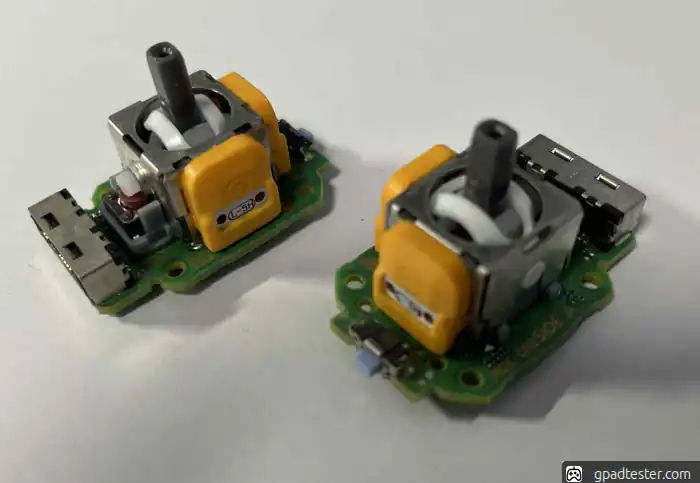
PS5 Edge Gamepad analog replacement and calibration: HALLA, TMR, original
PS5 DualSense Edge Analog Drift – How to Fix and Test Your Controller
If your PS5 DualSense Edge controller has issues like analog drift, random movement, or unresponsive input — you may need to repair or replace the analog stick.
👉 Before opening the controller, first test your gamepad online to confirm the issue.
● How to Test PS5 Edge Analog Drift
- Connect your controller to your PC.
- Open gamepad tester
- Move both analog sticks slowly.
- If the cursor moves on its own → you have analog drift.
● Issue Description
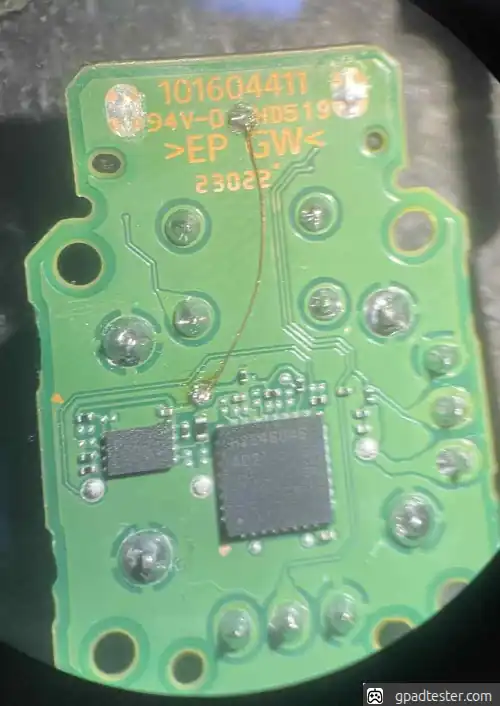
Calibrating the PS5 DualSense Edge requires adding a wire (see photo) that connects two points on the analog module.
Supplying 1.8V to the top test point is required for:
- calibration process
- saving calibration data permanently
● Repair Steps
The solder pads on the motherboard are very delicate — be extremely careful.
- Set hot air station to 420°C.
- Set soldering iron to 420°C.
- Apply flux and add fresh solder to all pins.
- Heat evenly until solder becomes fully liquid.
- Carefully remove the analog stick.
- Clean pads using flux and solder wick.
- Place new analog, apply flux, solder all pins.
- Add extra wire to the top test point (see photo).
● Test After Repair
After replacing the analog, you should immediately verify if everything works correctly:
- Open gamepad tester
- Move analogs in full range.
- Use gamepad tester calibration tool: Go to calibration tool
- Check if movement is smooth and centered.
- Ensure no unwanted input appears.
👉 If everything looks stable — your repair was successful.
● Gallery